9. Nesting#
Nest packs the selected parts onto the stock so the least material is wasted. It is a Path Tool, not an operation — it moves your geometry rather than cutting anything. (The one exception: when it fills the stock with copies of a part, it can give each copy the toolpaths the part already has. See Fill stock with copies.)
The goal is not only to fit everything on. It is to leave what's left over as one usable piece, rather than as scraps between parts.
Using it#
Select the parts, open Nest from Path Tools, set the options, and press Nest on Stock.
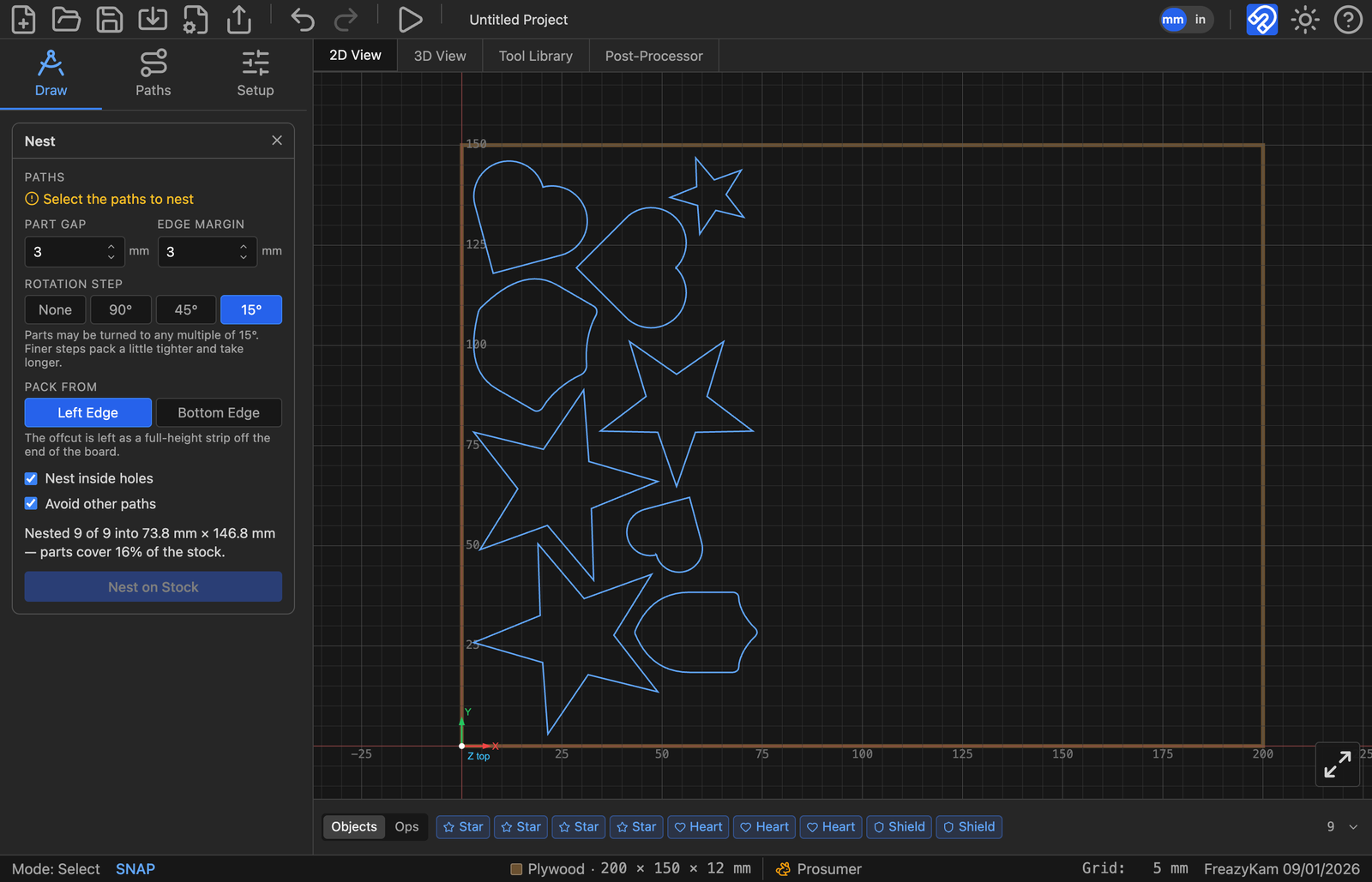
Nine parts packed from the left edge. The report reads "Nested 9 of 9 into 73.8 mm × 146.8 mm — parts cover 16% of the stock", and what's left is a full-height strip you can put back on the rack.
Anything that won't fit is parked above the stock rather than silently dropped, so you can see what didn't make it and decide what to do — or, with Use more sheets ticked, carried onto another sheet of the same stock. See More than one sheet.
The settings#
| Setting | What it does |
|---|---|
| Shared lines | Place parts exactly one cutter apart, so neighbours share a cut. Pick the end mill; then cut the sheet with Profile's Optimize Path |
| Part Gap | Space between parts. At minimum, leave room for the cutter plus tabs |
| Edge Margin | Space kept clear at the edge of the stock — for clamps, and for the fact that the edge of a board is rarely straight |
| Rotation Step | How freely parts may be turned |
| Pack From | Which edge parts pile against, and therefore what shape the offcut is |
| Fill stock with copies | Repeat a single part — as many as fit, or a set number — and optionally copy its toolpaths and tabs to every copy |
| Nest inside holes | Let small parts sit in the holes of larger ones |
| Avoid other paths | Treat unselected paths as ground already taken |
| Use more sheets | Put what won't fit onto more sheets of the same stock, rather than parking it. On by default; hidden while filling |
Rotation Step is a step, not a limit#
This is the one that looks broken if you misread it. 45° does not mean "up to 45°" — it means parts may be turned to any multiple of 45°, so a half turn is allowed. And 15° allows everything 45° does, plus more.
| Setting | Use when |
|---|---|
| None | The stock has a grain to follow, or the parts are veneer-faced. Parts stay as drawn |
| 90° | Sheet goods where you still want a tidy, square layout |
| 45° | A reasonable compromise |
| 15° | Tightest packing. Slowest to compute |
Finer steps pack a little tighter and take longer. On plywood or MDF there is no reason not to use 15°; on anything where the grain shows, use None and accept the waste.
Pack From decides the shape of the offcut#
Both options waste the same area. They differ in what shape it's in, and that is what decides whether it's stock or scrap:
- Left Edge — the offcut is a full-height strip off the end of the board.
- Bottom Edge — the offcut is a full-width band along the top.
Pick whichever leaves a piece you'd actually use. A long narrow strip is useful for rails and edging; a wide shallow band suits panels.
Nest inside holes#
Lets a small part drop into the middle of a ring or a large opening. It saves material, with one consequence stated plainly: the offcut comes out in pieces. You are trading the one-usable-piece goal for raw yield. Worth it on expensive stock, often not worth it on plywood.
Avoid other paths#
Treats paths you didn't select as ground already taken. This is how you add parts to a board that already has work laid out on it — select only the new parts, tick this, and they will pack into the space that's left rather than on top of what's there.
Fill stock with copies#
Available when exactly one part is selected. A part can be several paths — a plate with text engraved inside it nests as one part. Tick the box and two more settings appear:
| Setting | What it does |
|---|---|
| Parts | How many parts you want on the stock, counting the original. Leave it blank to fit as many as the stock will take |
| Copy its N toolpaths to every copy | Shown when the part already has toolpaths. Ticked by default |
The button changes to Fill Stock. Each copy is an object in its own right — cut it, move it or delete it like any other, and the report tells you how many were added.
If you ask for more parts than the stock can hold, it places what fits and says how many short it came: "Only 12 fit on the stock — 4 short of the 16 asked for."
Toolpaths and tabs come with the copies#
Set up the toolpaths on one part first, then fill. With Copy toolpaths ticked, every operation built on the part — a pocket, a drilling, an engraving, an outside profile — is copied onto each copy and generated, so you don't have to select the copies and apply them again.
- Edit one, edit them all. The copies join the original operation's batch, so opening any of them in its form and changing the depth or the tool changes every copy. The Objects strip still shows one chip per operation, not one per copy.
- Cut order is kept. Each operation's copies follow it in the program, so the job runs every pocket, then every profile — the tool isn't changed back and forth for each part.
- An Optimize Path profile is not copied. Instead the copies are added to that one profile, so the whole sheet is routed together and shared lines are cut once.
- Inlays are not copied. An inlay is cut as a matched pair from two boards, so filling one half is not filling the pair. The form tells you when it skipped one; apply the inlay to the copies yourself.
- An operation that also uses a path outside the part (a pocket whose island is a different part, say) is left alone.
Holding tabs are always copied, whether or not Copy toolpaths is ticked — they belong to the path, the same as when you duplicate it. Each copy's tabs sit in the same places round its outline as the original's, even when the copy has been turned.
One Undo takes the whole fill back off: the copies, their toolpaths and their tabs.
Changing a fill later — the Nest chip#
A fill puts one Nest ×N chip in the Objects strip, where N is the number of parts on the stock, the original included. A part made of several paths counts once.
Click it to open Edit Nest with the settings the fill was made with. Change the part count, the Pack From edge, the gaps, the rotation — anything — and press Update Nest. The old copies, and the toolpaths made for them, are replaced by a new fill of the original part in one step.
Changes you make to the original — its shape, its toolpaths or its tabs — reach the copies the next time you press Update Nest. Changes made to a single copy are lost when the fill is updated, since that copy is replaced.
More than one sheet#
When the parts won't all go on one board, the job can run over several. Each sheet is another board the same size as your stock, drawn on the canvas beside or below it with a Sheet N label on its corner.
Letting the nest add sheets#
With Use more sheets ticked, the nest packs sheet 1 as full as it can, then carries what's left onto a fresh sheet 2, and so on until everything is placed. The last sheet holds the remainder. The report says how many it took:
Nested 40 of 40 on 3 sheets — the first is 71% covered.
The sheets are laid out as a square-ish grid — two side by side, then 2 × 2, 3 × 2, 3 × 3 — rather than one long row, so they fit on screen. On stock wider than it is tall, the grid grows downward first.
A part too big for even an empty sheet is still parked above the stock, and the form says so: "1 part would not fit even on an empty sheet — parked above the stock."
Untick Use more sheets to keep the old behaviour: one sheet, and the rest parked.
A double-sided or tiled job is one board, so it never nests onto more sheets — the option is replaced by a line saying so. See 14. Double-sided and tiled jobs.
Adding a sheet by hand#
Drag a part off the stock to the right, or below it, and a new sheet appears under it. There is no button and nothing to set — a sheet exists wherever something lies on it. Drag the last part off a sheet, or delete it, and that sheet goes away again.
- Which sheet a part is on is decided by where it lies — by the middle of its outline. Drag a part from sheet 2 onto sheet 3 and it is cut with sheet 3 — its toolpaths regenerate where it now lies, the same as after any move.
- Above and to the left of the stock is free workspace. Parts parked there never make a sheet; they count with sheet 1, and the export review warns that they are off the stock, just as it always did.
- The 50 mm gap between sheets is only spacing on screen — it is split down the middle, so a part more than halfway across it belongs to the next sheet.
- Sheets are numbered in reading order — across, then down — whatever order they were made in. Removing one renumbers the rest.
Nesting onto more sheets and dragging onto them are the same thing: after a nest you can drag parts between sheets to even them out, and a sheet you made by hand is just another sheet to the next nest with Avoid other paths ticked.
Simulating and running one sheet#
With more than one sheet, a ◀ Sheet 1 of 3 ▶ picker appears in the toolbar. It picks the sheet that Simulate G-code plays and that the Machine tab's Send to card sends. The active sheet's label is shown bold on the canvas, and the 3D view shows only that sheet.
Exporting#
Export G-code writes one file per sheet — every sheet, whichever one is picked.
The button reads Export 3 sheets. Files are named after the project with the sheet
number added — tray_sheet1.gcode, tray_sheet2.gcode — and each one can still be
split by tool.
Every file is cut from its own sheet's corner. The toolpaths for sheet 2 are moved so that sheet 2's corner is the work origin, exactly as sheet 1's is. On the machine: run sheet 1, load a fresh board, zero it the same way, and run sheet 2.
A sheet with parts on it but no toolpaths yet gets no file, and the review tells you how many of the sheets have something to cut.
Reading the report#
After a nest, the form reports what happened:
Nested 9 of 9 into 73.8 mm × 146.8 mm — parts cover 16% of the stock.
- "9 of 9" — everything fitted. A smaller first number means some parts were parked off the stock.
- "on 3 sheets" replaces the dimensions when the nest used more than one sheet; the percentage is then sheet 1's coverage.
- The dimensions are the bounding box the parts actually occupy, which tells you how much board you'd need if you cut this layout from a smaller piece.
- The percentage is coverage, not efficiency. Awkward shapes cover a low percentage and may still be packed as tightly as they can be.
Before you cut#
Nesting moves your parts. Two things follow:
- Operations that referenced those paths need regenerating — they'll be marked amber in Paths → Toolpaths.
- Check your holding tabs. Tabs travel with the path — and are copied onto filled copies — but a tab that was in a sensible place before may now be facing a neighbour with 3 mm between them.
On a tight nest, use holding strips instead of tabs. Between closely packed parts, the waste a tab holds a part to is itself cut loose by the neighbouring cuts, and the two come free together. Select the sheet's parts, open Tabs, choose Joined by strips and Place Strips: every part is joined to its neighbours across the gaps, and through them to the sheet's edge. Profile the parts first — the strips join only parts that are cut through. See Holding strips.
Next#
- 10. Simulating and exporting — the review before you cut
- 11. When something goes wrong